
Updated: August 6, 2026 at 14:02 UTC / August 6, 2026 at 23:02 JST
Mistfall Hunter Server Status & Connection Issues Hub
Use this page to separate a confirmed service incident from a server-full message, platform outage, regional access rule, or local connection problem. It is a timestamped editorial check—not a live telemetry dashboard.
Quick Answer
No global outage or downtime announcement was found in the official Mistfall Hunter Steam announcement feed checked at the time above. The newest first-party post, August 6 Live Update, says a no-downtime update was planned for 09:00 UTC and that players need to update the game client through their app store afterward. It lists fixes, but does not confirm a global service incident, capacity event, root cause, or recovery time. A server full message or queue can mean a service is reachable but temporarily cannot admit another session; neither alone proves that all Mistfall Hunter servers are down.
Current Server Status
| Layer checked | Current evidence | Safe conclusion |
|---|---|---|
| Mistfall Hunter official feed | No global outage or downtime notice appeared in the official announcements reviewed at 14:02 UTC on August 6. | The newest official post describes a no-downtime client update, not a global service incident. |
| Current game update | The August 6 Live Update was planned for 09:00 UTC and says the game client must be updated through the app store afterward. | Keep the client current. Do not turn the patch list into an outage, capacity, root-cause, or recovery claim. |
| Platform service | Steam Support, Xbox Status, and PlayStation Status are separate official checks. | A platform incident can block access without proving a Mistfall Hunter-wide outage. |
| Regional access | The launch FAQ lists five server countries and a North American account/build rule. | A build or region restriction is an access rule, not a server-down confirmation. |
Is Mistfall Hunter Down?
Call an incident confirmed only when a first-party notice names the affected service, platform or region and gives a timestamp or status. Search spikes, queue screenshots, player reports, ping changes, and a single failed login are useful demand signals, but they do not establish global downtime.
If the official feed has no incident notice, continue through the platform, region, client-build, and local-network checks below. If the game opens but a specific mode or party fails, use the exact symptom rather than saying every server is down.
Server Full / Capacity Issues
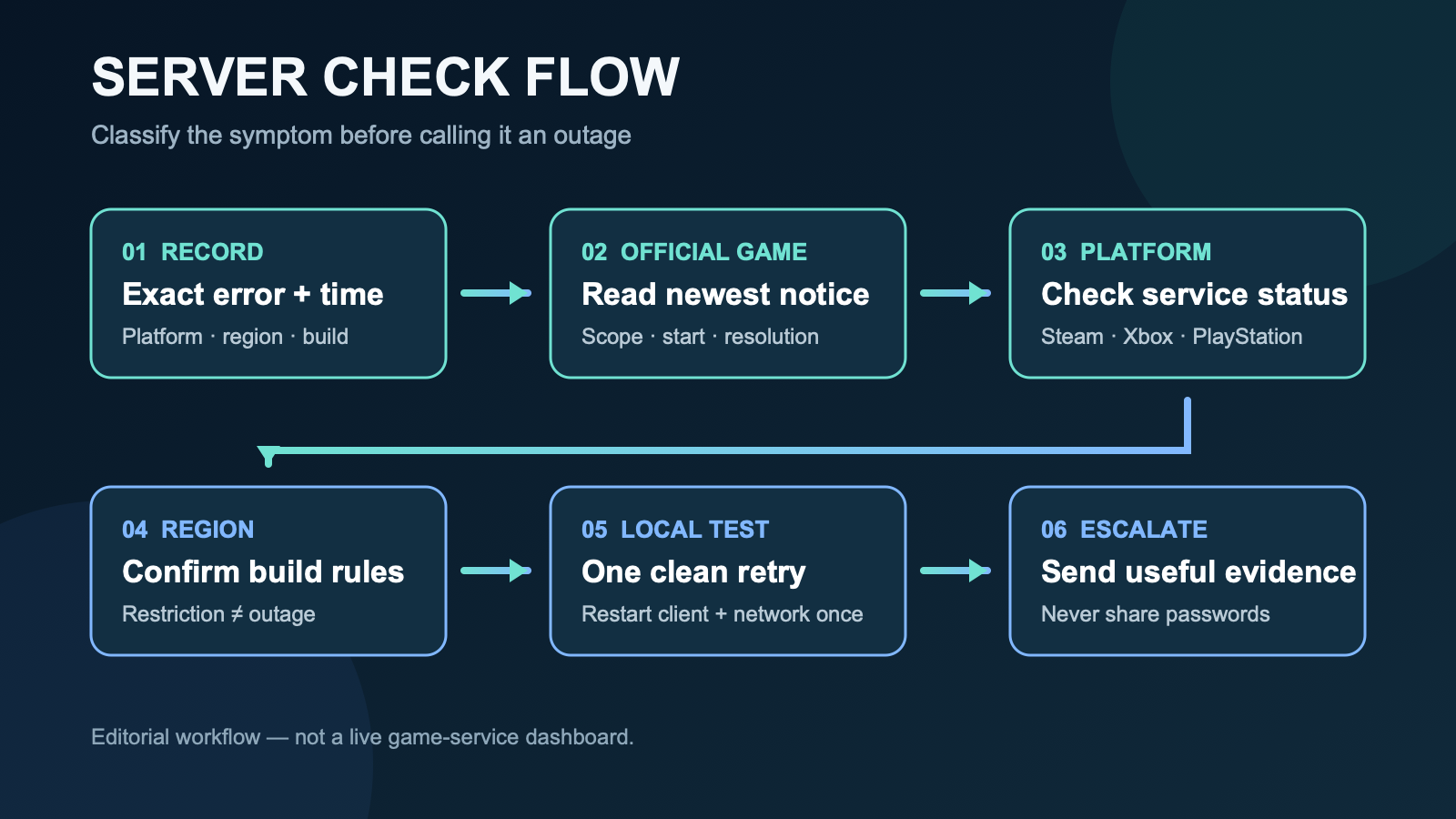
A full-capacity message is different from a silent connection failure and different again from a first-party outage notice. Preserve the exact wording and time. If a queue is moving, restarting can return you to a different position; no unofficial queue estimate should be presented as a guaranteed access time.
| What you see | What it supports | What it does not prove | Best next step |
|---|---|---|---|
| Server full | A capacity or admission problem for the selected service at that moment. | That every region or platform is offline. | Save the message and timestamp; check the newest official notice before a measured retry. |
| Visible queue | An admission system is responding. | A guaranteed wait time or recovery time. | Watch whether the queue changes and avoid restart loops. |
| Connection failed | The client could not complete a connection. | Whether the cause is the game, platform, account region, build, or local network. | Run the checks below and keep the exact error text. |
| Official incident notice | An incident within the notice’s stated scope. | Impact outside the named time, platform, or region. | Follow the first-party update until it is marked resolved. |
Connection Troubleshooting
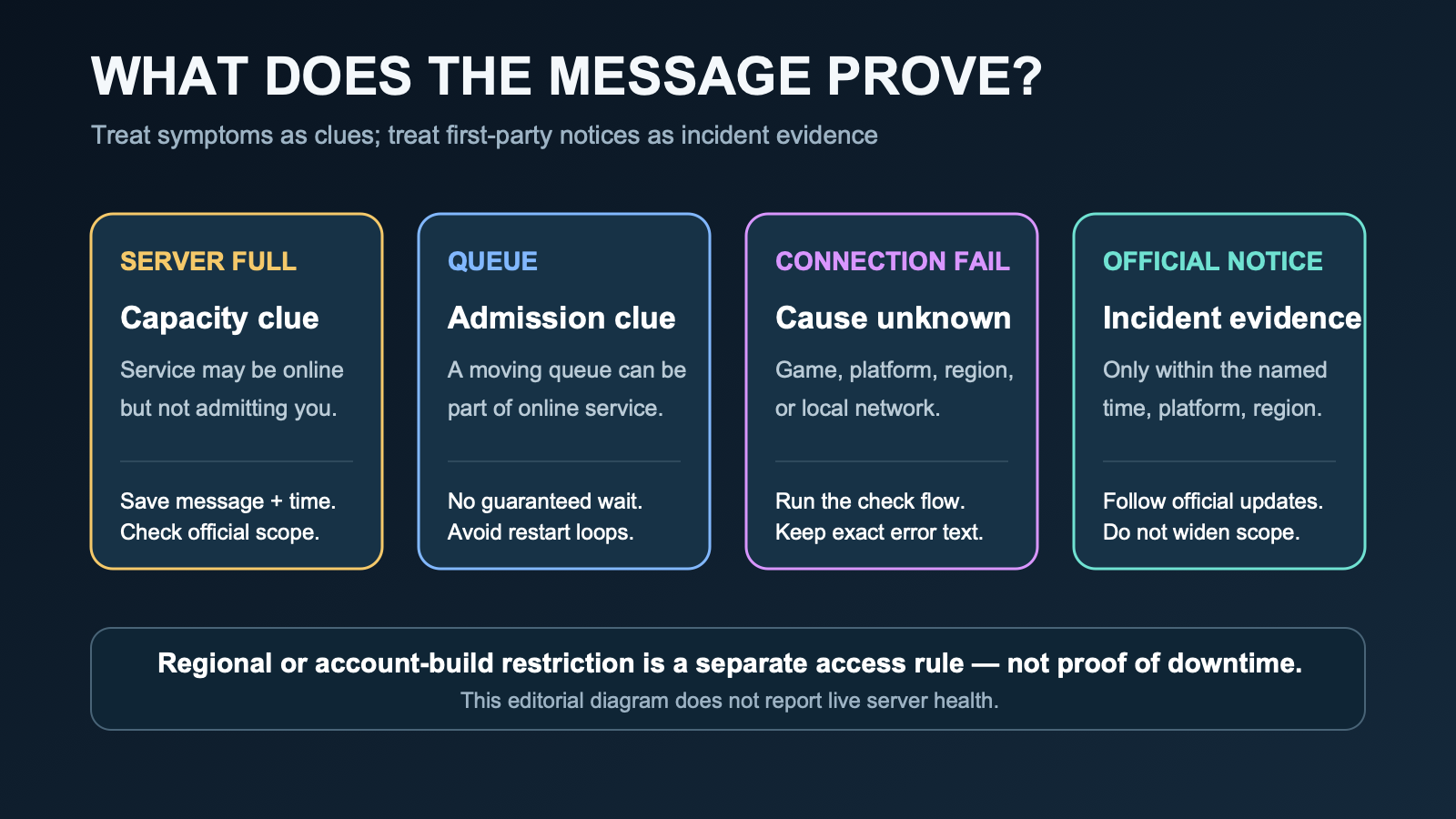
- Record the evidence. Save the exact error, platform, account region, selected server, client version if visible, and time with time zone.
- Read the official game feed. Check the newest Mistfall Hunter announcement for incident, maintenance, or required-update instructions.
- Check your platform. Use Steam Support, Xbox Status, or PlayStation Status as appropriate.
- Confirm the region/build rule. A party can fail because accounts cannot access a compatible server pool, even when the service is online.
- Run one clean local test. Close and restart the game and platform client once, confirm the game is updated, then restart the network connection once if the platform itself is reachable.
- Escalate with useful details. Use in-game customer support when the issue persists. Never share a password, authentication code, or private account data with an unofficial account.
For crashes, black screens, stuttering, and controller-specific faults, use the Known Issues guide or the Controller Support and PC Requirements guide. Those symptoms do not automatically indicate a server outage.
Regional Server Issues
The official launch FAQ says server locations are being deployed in China, the United States, Germany, Singapore, and Brazil. It also states that store accounts registered in the United States, Canada, Mexico, Puerto Rico, and the U.S. Virgin Islands receive the North American build by default and can access only the North American servers in the United States.
| Question | Official evidence | Decision boundary |
|---|---|---|
| Which server countries are named? | China, United States, Germany, Singapore, and Brazil. | A country location does not guarantee a particular player’s latency. |
| Is a dedicated OCE server listed? | No Australia/Oceania location is named in the checked launch FAQ. | Community requests cannot confirm a new server location. |
| Can named North American accounts select another region? | The launch FAQ says those accounts use the North American build and US servers. | Cross-platform matchmaking does not prove that this account-build restriction is bypassed. |
| Does an unavailable region mean all servers are down? | No. | Check the account/build rule and any current official incident scope separately. |
For party and compatible-server questions, see the Co-op, Solo and Crossplay guide.
Official Updates
| Date | Official update | Server-status relevance |
|---|---|---|
| August 6, 2026 | August 6 Live Update | Describes a no-downtime update planned for 09:00 UTC and requires an app-store client update afterward; it does not announce a global outage, capacity event, root cause, or recovery time. |
| August 6, 2026 | Roadmap and Launch Rewards: Wave 3 | Says an August 6 client update will improve overall stability and that stuttering and latency reports are under investigation; it does not announce global downtime, maintenance, a root cause, or a recovery time. |
| August 3, 2026 | Fair Play Penalty Announcement | Discusses cheating and illegal-teaming enforcement; it does not announce an outage, maintenance window, capacity issue, or recovery time. |
| August 1, 2026 | The Second Wave of Launch Rewards | Says a client update is planned for the following week and detailed notes will follow; it does not announce global downtime. |
| July 30, 2026 | Launch Rewards & July 30 Update | Lists a fix for some console matches that could not reconnect after a disconnect and requires players to update through their app store. |
| July 29, 2026 | Known Issues | Previously documented some console reconnection failures; use newer notes when deciding whether a listed issue remains current. |
| July 24, 2026 | Official Launch FAQ | Defines server countries and the North American account/build restriction. |
Community Reports
Public discussion is monitored for repeated symptoms worth checking. It remains demand_signal_only and factual_proof false: player reports cannot prove a global outage, root cause, server location, recovery time, or official workaround.
- Current demand signal: public Reddit threads dated August 4–6 discuss high latency, region assignment, connection loops, rubber-banding, and mixed experiences between players. This is a prompt to investigate—not proof of incident scope, server placement, cause, or workaround.
- Launch demand signal: a July 30 public thread reported a visible login queue. A queue report supports the need for capacity guidance but does not prove present-day capacity.
- Official boundary: the launch FAQ, platform status pages, and current announcement feed outrank community explanations for factual claims.
Monitoring links: high-ping and region question, public issues discussion, and latency discussion. Usernames and personal information are not reproduced on this page.
Server Status FAQ
Are Mistfall Hunter servers down?
No global outage or downtime announcement was found in the official Steam feed checked on August 6, 2026 at 14:02 UTC. The newest Live Update describes a no-downtime client update, not a global service incident. This is not a live guarantee; check the newest first-party notice for anything posted later.
What does Mistfall Hunter server full mean?
It supports a capacity or admission problem for the selected service at that moment. It does not by itself prove that every region or platform is offline.
Is a server queue the same as an outage?
No. A queue can be part of a responding admission system. It does not guarantee a wait time, and it does not prove the service is unavailable everywhere.
Is Mistfall Hunter under maintenance?
The newest official post describes a no-downtime update planned for August 6 at 09:00 UTC and says players must update the client through the app store afterward. It does not announce global downtime. Recheck the newest announcement before relying on this timestamp.
Why can I not connect to Mistfall Hunter?
A failed connection does not identify its own cause. Check the game notice, platform service, client update, account/build region rule, and one clean local restart, then report the exact error through in-game support if it continues.
Which Mistfall Hunter server regions are official?
The official launch FAQ lists server locations in China, the United States, Germany, Singapore, and Brazil.
Is there a dedicated Oceania server?
The checked official launch FAQ does not list an Australia or Oceania server location. Community requests or routing observations do not confirm one.
What should I include in a connection report?
Include platform, account region, selected server, exact error, client version if visible, time with time zone, and the checks already attempted. Never include a password or authentication code.